Your server
Host KOYA on your own infrastructure. You decide where your communication system runs.
Family photos, work documents, messages and calls in a system you control. KOYA combines a server on your equipment with apps on Android phones.
In Japanese, 小屋 means a hut or small cabin. That is our idea of KOYA: a quiet place to gather with family or a team, talk about what matters and hear each other.
You choose the people. Encryption protects the conversation.
Explore the security ↗License the KOYA server and apps, host the system on your equipment and invite the people you want to talk with.
Host KOYA on your own infrastructure. You decide where your communication system runs.
Invite participants, approve devices and revoke access when it is no longer needed.
Control device history retention and attachment availability. Downloaded copies remain with recipients.
Messages and files are encrypted on participant devices. The server delivers them without decryption keys.
KOYA is licensed software: the server runs on your equipment and apps on participant phones. You choose hosting, users and maintenance.
Run KOYA on your home computer or company server. All system components run on your infrastructure. If you rent a server, choose a provider you trust.
You manage the server and decide who gets access. Keys are generated on your equipment during setup. Remote support connects only with your permission.
Windows Home verifies a licence bound to your server key locally. Activation does not transmit conversations or personal files. Transfer terms are agreed when purchasing.
Your administrator controls devices, backups and updates. Business support scope, response times and responsibilities are specified in the contract.
The public demo room lets you explore KOYA. Use your own server and private invitations for personal conversations and business data.
Usage rights for the KOYA server and apps. Scope, price, updates and support are agreed before purchase. Organisational deployment requirements and SLAs are discussed separately. Payment and delivery are contractual; this website is not a contractual offer.
A self-hosted installation sends messages and files through your server; conversation history stays on participant devices. Opening a shared location in Google Maps contacts Google. Your chosen certificate authority issues the connection certificate.
You receive software usage rights and operate the system yourself. Applicable duties depend on actual operation and the contract. On-Premise alone does not grant an exemption from legislation. Personal-data roles, Russian messaging-service obligations and cryptographic licensing requirements need a separate assessment for each delivery.
Information-security and documentation requirements are discussed before deployment. KOYA is not offered as a certified security product; systems with special requirements need a delivery-specific assessment.
Talk to family, send a document to a colleague or share a meeting location. No phone number is required to register.
Private chats, groups, voice messages, voice and video calls. Type a reply, record a message or call, all in one app.
Send photos, videos and documents with captions. Transfers resume after a dropped connection. Share a location so the recipient can open it in Google Maps.
Choose a theme, notification sound and history retention period. Mute notifications when you need to focus.
Messages and files are encrypted before sending. Reading keys stay on participant devices; the server receives encrypted data.
An explanation of the principle, not an actual network packet.
Each private conversation has its own keys. They change as messages are exchanged and stay on participant devices.
The app verifies protected data to detect changes made during transmission.
Conversations live in an encrypted database on your phone. A PIN or supported biometrics protects access to the app.
The server holds encrypted packets until the recipient acknowledges them, for up to 24 hours. It then deletes them. Decryption keys stay with the participants.
The server never receives your conversation keys. It forwards encrypted messages and files and helps connect calls. Delivery still needs technical information: IP addresses, participant names and identifiers, room, timing and routing. End-to-end encryption hides the content, not this metadata.
Starting a conversation should not mean handing over a phone number, email address or identity documents. Choose a name your people will recognise — your own, or one you make up. KOYA does not tie your conversations to those personal details. Your circle grows through personal invitations, with end-to-end encryption protecting what you share.
How KOYA handles your data ↗For home, a server on the family PC. For business, a deployment and delivery terms tailored to the organisation.
For family and friends
Windows demo available
Your place for photos, plans and conversations. A server on the family PC, KOYA on phones, and access through your invitations.
For teams and organisations
For organisational deployment
Work messages, documents and one-to-one calls on your infrastructure. You manage device access and retention settings.
For larger organisations
Discuss requirements
For organisations with specific workload, integration and continuity requirements. Discuss the task and define solution scope before signing a contract.
Try KOYA free in the demo. Ongoing use of the server and apps requires a licensed delivery; scope and price are agreed before purchase.
KOYA Home runs on your Windows PC while the family talks on Android phones. The wizard helps with setup. Internet access requires a public static IP address, available from your ISP.
Download the complete ZIP and run KOYA-Home-Setup.exe. The wizard sets up the server on your PC; install KOYA on Android phones for messaging and calls.
The wizard explains the computer and router settings needed to connect phones over the internet. The server can start automatically with Windows.
Activate the owner on your primary phone, then issue single-use QR invitations. The owner can enable cascading invitations. The website’s public demo room is separate from your server.
A demonstration package for evaluating KOYA, not for production use. No licence is required for testing. Each file is limited to 1.5 MiB. The installer is not digitally signed for Windows. Contact us about commercial delivery and support.
Extract the entire ZIP before opening the wizard. These are real screens with example values. The address 203.0.113.10 is for documentation only; enter the public static IPv4 assigned by your ISP. Screens are currently in Russian.
The demo does not include a commercial licence. Production terms and supported capacity are agreed when purchasing.
Sizes use binary megabytes (MiB). Pending encrypted delivery is limited to 512 packets per recipient and 64 MiB in total. A packet is a transmission unit, not necessarily one chat message. Delivered chat history follows the app’s retention settings.
Home is a Windows server; the APK is the Android app. Evaluate messaging, voice messages, private voice and video calls, invitations and access management. Phones need network access to your server.
Home limits each file to 1.5 MiB. There is no enforced trial expiry and this package needs no licence file. Concurrent call capacity is not guaranteed: it depends on your PC, network and connection route. This package is for evaluation, not mass or production use. The Windows installer is not digitally signed. Commercial licensing, support and deployment scope are agreed when purchasing.
Home creates your own private room. The website QR leads to a separate public demo room.
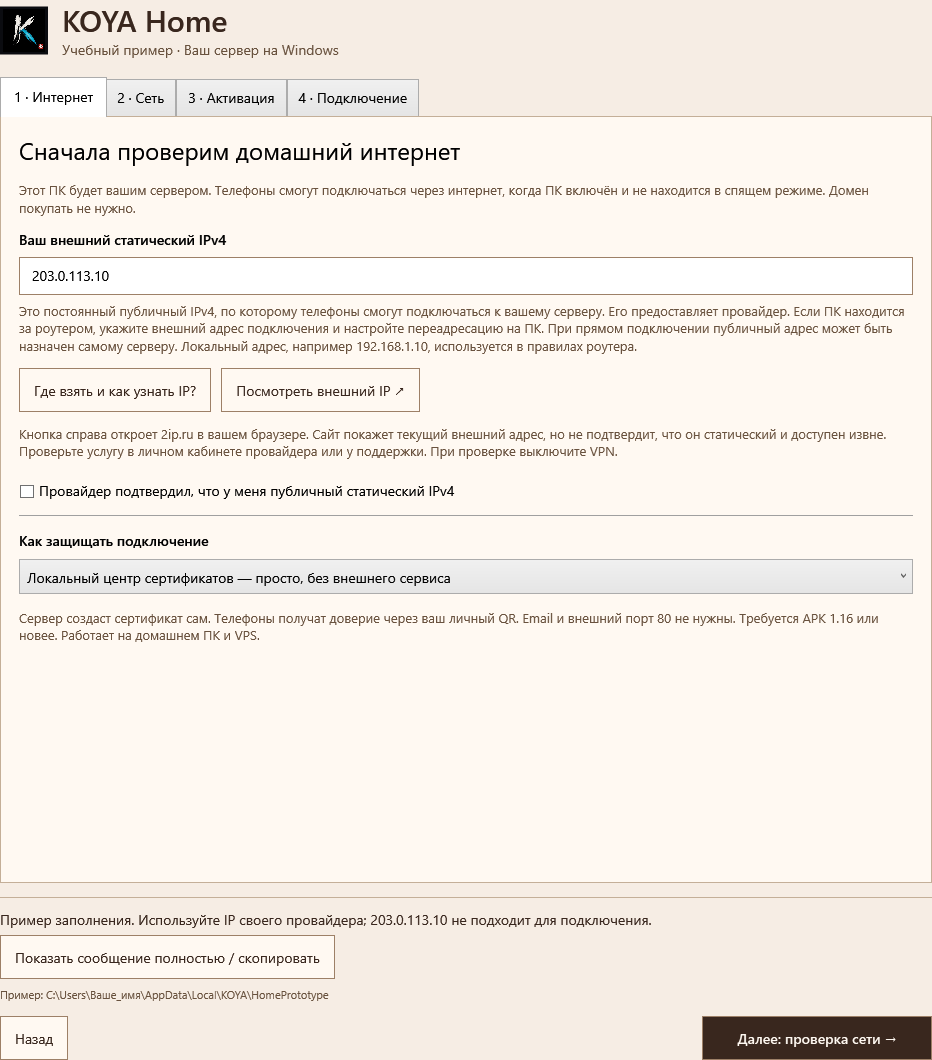
Extract the entire ZIP and open KOYA-Home-Setup.exe. If the wizard requests permission to run, approve only a package obtained from the KOYA website. Ask your ISP for a public static IPv4. Keep the default local certificate: your QR carries trust, with no external certificate service or email.
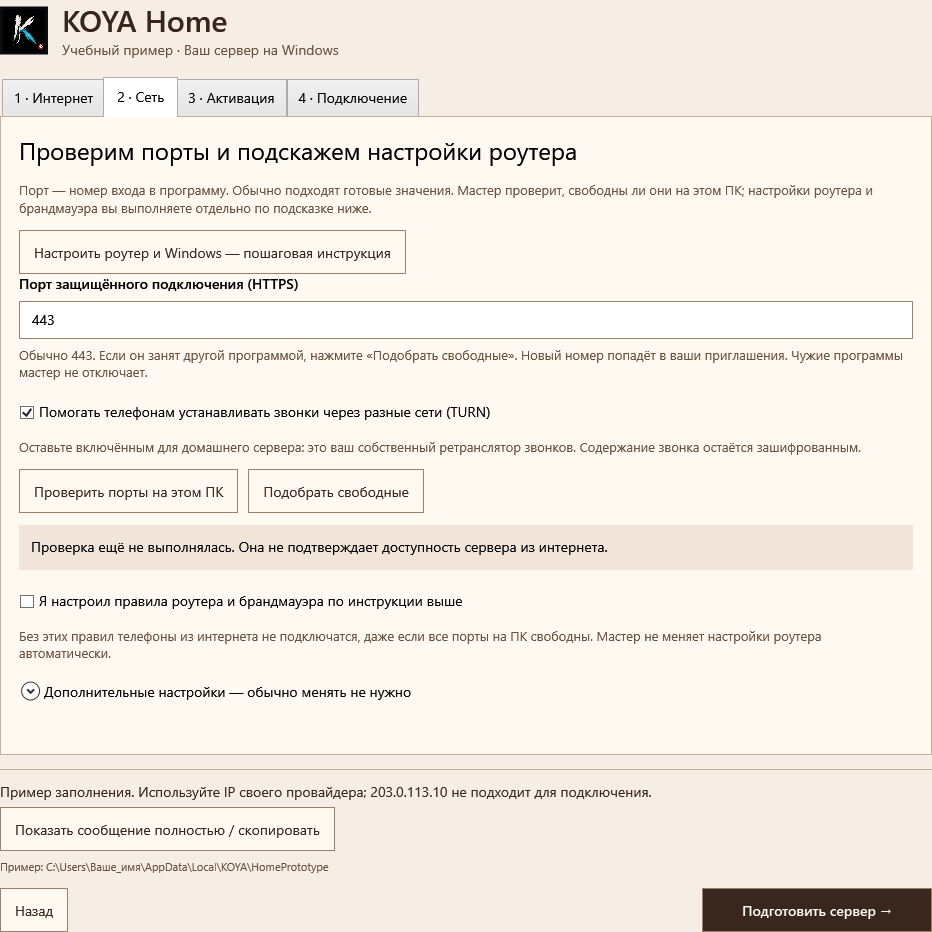
Open the step-by-step guide in the wizard. It shows the PC’s local IP, router address and rules for your selected ports. Reserve the PC’s address, configure port forwarding and allow the listed inbound ports in Windows. The default local certificate shares trust through your QR; no email or external TCP 80 is required. Confirm setup before preparing the server.
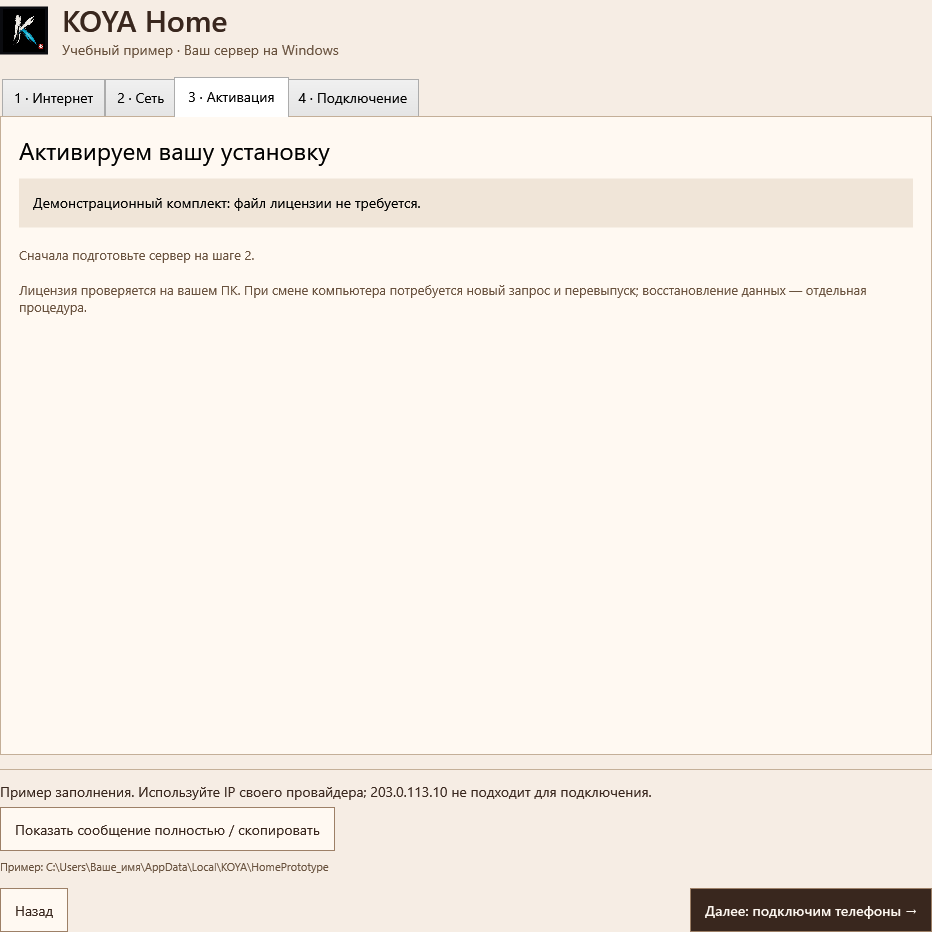
The demo needs no licence file. For a purchased package, send only the activation request and order number to the publisher; install the returned license.json. Keep private keys on your equipment.
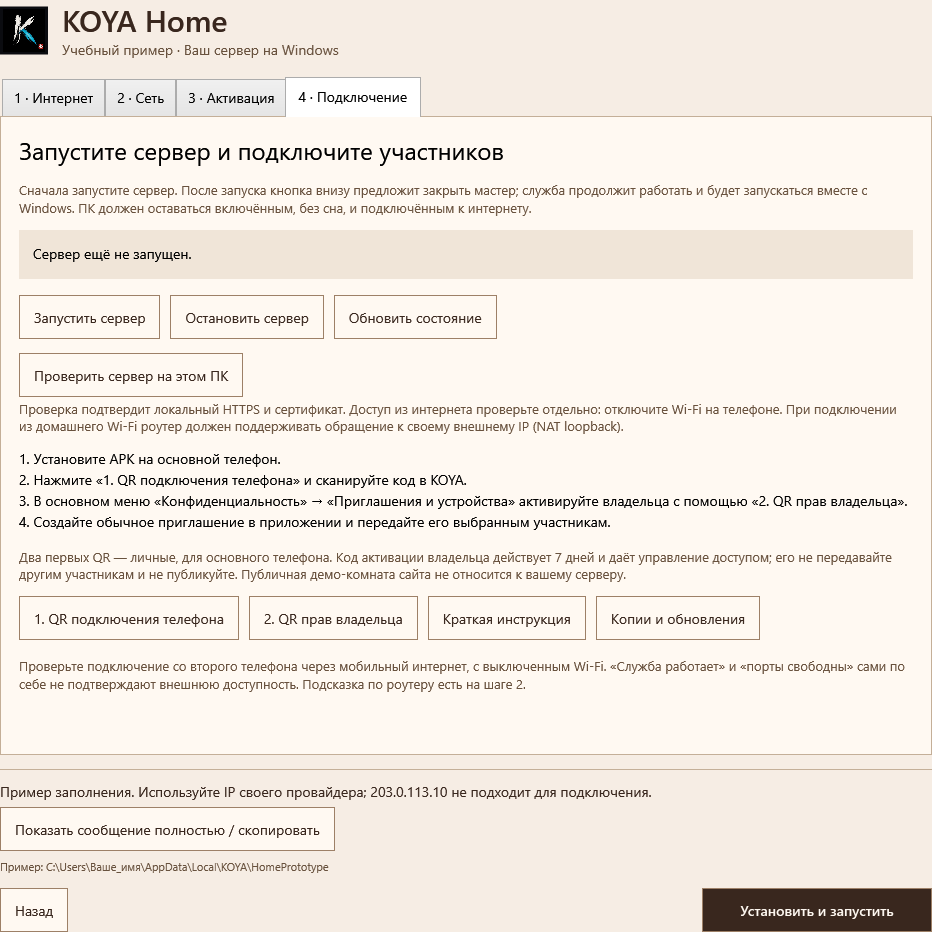
Start the service, connect the owner phone with private QR codes and invite participants from the app. Test a second phone over mobile data. Keep the server PC awake and online.
Ask your ISP about CGNAT or blocked inbound ports. Two routers require forwarding on both. Use the main Wi-Fi or a LAN cable. Find the router address under Default Gateway in ipconfig; use the device’s administrator credentials. Rostelecom QBR-1041WU v2S uses Security → Port forwarding; other models differ. If mobile data works but the same invitation fails on home Wi-Fi, check NAT loopback support. Keep existing rules and ISP settings; do not bypass HTTPS verification.
A family needs stable internet and an always-on PC. Organisations size hardware by users, files and concurrent calls. These are planning estimates; the configuration is scoped to your workload.
Supported Windows 11 x64. 2 CPU cores, 4 GB system RAM minimum; 8 GB recommended. SSD with 2 GB free plus data and backups. TPM 2.0 preferred.
Public static IPv4 and port forwarding to the PC. The default mode needs no external certificate authority or port 80. For a small circle, plan stable 20 Mbps in both directions, Ethernet and an always-awake PC.
Small-pilot starting point: Linux x64, Docker Compose, 2 vCPU, 2 GB RAM and 20 GB SSD plus data and backups.
Public IPv4, permitted TCP/UDP and a 100 Mbps starting bandwidth budget. Check traffic, packet-rate and UDP limits with your provider. This is not a guaranteed call count.
Separate signalling and TURN nodes. A planning example: 2 signalling nodes at 4 vCPU / 8 GB RAM and 4 TURN nodes at 8 vCPU / 16 GB RAM with 10GbE.
Sizing considers redundancy, network traffic and node failure. Solution scope and capacity are determined for your deployment; these numbers are planning estimates.
At 2 Mbps sent by each participant, with every call relayed by TURN, aggregate relay ingress is about 4 Gbps and egress about 4 Gbps. A planning margin of 25% gives about 5 Gbps in each direction. Lower TURN usage requires a different connection policy. The current TURN-enabled profile uses relay mode, so budget for 100% TURN. The 2 Mbps value is an Enterprise planning assumption, not the current demo bitrate. Signalling and other traffic are additional. This is a calculation, not a KOYA benchmark.
The server needs no camera or dedicated video GPU: phones process video. Calls need bandwidth and a stable network; files and backups need disk space. The Home demo allows attachments up to 1.5 MiB.
Certificate requirements and Windows support: Let's Encrypt ↗ · Microsoft ↗
Email or call us with your users and preferred server location. We will discuss a family or organisation package, licence price, setup and support. All terms are agreed before purchase.
Dmitry Nikolaevich Boyko · Russian professional income tax payer (self-employed)
Taxpayer identification number (INN): 190158352451
This website does not take payments. Do not send passwords, private keys, private invitations or participant conversations.
Bring your family, project team or partners into their own space. You decide who connects.
Development plans, preparation for negotiations, budgets and decisions before they are announced.
Department conversations, launch coordination, working drafts and internal documents.
Discuss proposals, designs and project terms with a client in a separately invited circle.
Photos, household plans, trips and conversations that do not need a public audience.
Unpublished ideas, works in progress and plans for a small private community.
Organise an event, expedition or shared journey with a dedicated chat for the task.
Work discussions, documents and calls on your organisation’s server. You manage employee access and system maintenance. Registration needs no personal phone numbers; conversation keys stay on participant devices.
The employee app runs on Android. Server deployment, user counts and support terms are scoped to your organisation.
Start with two Android phones: exchange messages, send a file and call each other. Use test data: the demo room is public.
Explore the demoEveryday family conversations, work coordination, ideas and small-team documents are KOYA’s core use cases.
Trade secrets and client materials call for agreed access policies, trusted devices and an assessment of your organisation’s requirements. End-to-end encryption protects content in transit; it cannot stop a recipient from saving or forwarding it.
Information-security and documentation requirements are discussed before deployment. KOYA is not offered as a certified security product; systems with special requirements need a delivery-specific assessment.
Download the signed Android APK. If prompted, allow installation from your chosen source.
Set a PIN and choose a display name. Supported devices also offer biometric unlock.
Get a link or QR code from your room administrator. Scan it with the camera or import a QR image.
No phone number, email address or identity documents. Choose a display name — a pseudonym is welcome — and join through a personal invitation. The app creates keys on your device for secure communication.
Up to 32 participants in one group chat. Separate groups can serve different purposes. User and concurrent-call capacity is sized for your installation.
An Android demo app and a separate Windows Home server with a setup wizard. The ZIP includes setup, activation, update and recovery instructions. Use the Android app for messaging and calls.
Use two Android phones to try chats, voice messages, files, voice and video calls. Download the separate Windows Home demo to explore hosting your own server. Demos are not for production use.
The same APK can connect to different servers through invitations. Your family or organisation needs its own server and private invitations. The public demo room on this site is for testing only.
The server delivers encrypted messages and files without reading keys. Content opens on participant devices. Connection information such as IP addresses is needed to operate the service and is visible to the server.
A private room needs a valid invitation from its administrator. Share private links and QR codes only with trusted people. This website also offers a public demo invitation for testing; do not use that room for private conversations.
The server temporarily holds the encrypted message and delivers it when the recipient connects, even if the sender has left. It deletes the packet after acknowledgement or after 24 hours. If the queue is full or the sender has no connection, the message stays on their phone for retry. Both participants need an updated app and must have exchanged keys online at least once. Background operation depends on Android settings.
Conversations live in an encrypted database on your phone. Attachments are encrypted before upload and stored on the server for delivery. The sender chooses availability within server policy. Removing a server file does not remove copies already downloaded by participants.
No. Local clearing and retention settings apply to your device. They do not remove copies saved or exported by another participant.
Save an encrypted backup using KOYA and keep its password. You can restore history from that backup after reinstalling. There is no automatic cloud restoration; an invitation restores room access but does not replace a conversation backup.
This website currently provides a tested Android build. A released iPhone version is not offered here.
Enable Background connection and permissions in the KOYA menu and allow notifications and background operation. One service waits for both messages and calls, with one quiet ongoing KOYA notification. Delivery uses your own server without external push services. Message alerts do not reveal text; chats require your PIN. After Android Force stop, open KOYA again. Device battery restrictions can affect reception.
A shared room to explore messages, voice notes and one-to-one audio and video calls. Install the APK and join from both phones with this invitation.
This room is public: any website visitor can join. Use test messages and files. The demo APK lets you explore the main features; the download includes no commercial licence. There is no trial expiry timer, but public demo availability may change. Use the Home package for your own private circle.
The demo does not include a commercial licence. Production terms and supported capacity are agreed when purchasing.
Sizes use binary megabytes (MiB). Pending encrypted delivery is limited to 512 packets per recipient and 64 MiB in total. A packet is a transmission unit, not necessarily one chat message. Delivered chat history follows the app’s retention settings.
Install the app on two Android phones and join the public demo room using the QR code above. The demo is for evaluation only; use test messages and files.